2016年4月17日 星期日

ASUS K43SD 筆電過熱 解決

ASUS K43SD 筆電過熱  解決


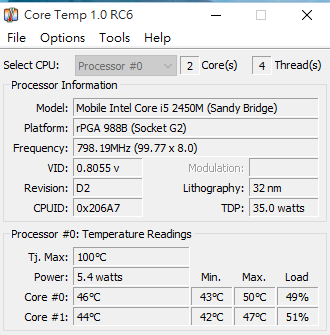
K43SD 這台筆電買了3年半了,連開個crome 也會過熱,風扇一直猛轉但是CPU 溫度還是高達99度,有時候甚至會熱到自動關機,我也試過清裸露出來的風扇(風骨因為有貼膜貼住了不敢清),甚至連同銅架都猜下來從上善熱膏,其實善熱膏有用,讓一開始的平均溫度重 70 降到 50度,但是只要一開軟體crome 滑個FB 就溫度飆到100度,就算買了1000多塊的散熱墊,最後一怒之下直接去買風扇+銅骨架(要換記得要上散熱膏)的零件後,把整個風扇跟風骨的膜 撕開 才發現整個風骨都被灰塵堵住了!!!!

^ 風骨(其實我不知道怎麼稱)後面都是超厚灰塵。

^ 正常不執行任何軟體時,正常溫度 應該是 44~ 60度之間,超過就真的要清了!


總結來說最影響筆電溫度的: 風扇跟風骨不要有灰塵!善熱膏老舊要重上基本上就可以解決了!

最後總結一下,善熱膏大概150、風扇風骨350、至少3小時(慢慢拆怕壞掉)的拆換時間 。真的不是很划算,所以建議還是不要自己處理花個500去給原廠清真的比較划算。另外...散熱墊真的無法治根阿!! 除非你是在玩大型遊戲倒是可以讓你至少不要100度可以維持在97度。


另外提醒 k43sd在分離鍵盤那面的機殼時! 光碟機下面有兩個超微小螺絲!!  一定要拆掉 不然應拆一定壞。

2016年4月12日 星期二

ASUS zenbook Arch GNOME Multitouch gestures use touchegg

ASUS zenbook Arch  GNOME Multitouch gestures  use  touchegg


由於多指手勢被gnume 阻擋 [註1] /etc/X11/xorg.conf.d/50-synaptics.conf的設定也會失效, 再從touchegg 原始碼所理解是直接與底層驅動存取,此解法比起抽掉 GNOME 監聽touchpad 功能後重從編譯好很多  如:這裡的方法。

1. Install  elantech-asustouchpad-dkms 4.0.2-1


2.Install xf86-input-synaptics and, from AUR, touchegg and touchegg-gce-git


    touchegg-gce-git為touchegg 的GUI設定工具。

3.Turn off touchpad: settings ->Mouse & Touchpad ->touchpad Off


4.新增 /etc/X11/xorg.conf.d/50-synaptics.conf


Section "InputClass"
        Identifier "touchpad catchall"
        Driver "synaptics"
        MatchIsTouchpad "on"
        Option "TapButton1" "1"
        Option "TapButton2" "0"
        Option "TapButton3" "0"
        Option "ClickFinger2" "0"
        Option "ClickFinger3" "0"

# This option is recommend on all Linux systems using evdev, but cannot be
# enabled by default. See the following link for details:
# http://who-t.blogspot.com/2010/11/how-to-meta:ignore-configuration-errors.html
        MatchDevicePath "/dev/input/event*"


EndSection
可參考各型號 driver 設定雖然此葉面已經過有點時:
https://code.google.com/archive/p/touchegg/wikis/ConfigureDevices.wiki

參數設定: https://wiki.archlinux.org/index.php/Touchpad_Synaptics

5.要再進入桌面前啟動:

vi      /etc/profile.d/touchegg.sh


#!/bin/bash
touchegg  &  > /dev/null

6.reboot


Some of the content is thus to Multitouch gestures with the Dell XPS 13 on Arch Linux.
[註1]

xorg.conf.d/50-synaptics.conf does not seem to apply under GNOME and MATE

GNOME and MATE, by default, will overwrite various options for your touch-pad. This includes configurable features for which there is no graphical configuration within GNOME's system control panel. This may cause it to appear that /etc/X11/xorg.conf.d/50-synaptics.conf is not applied. Please refer to the GNOME section in this article to prevent this behavior.


可能有關係:


Console tools

  • Synclient (Recommended) — command line utility to configure and query Synaptics driver settings on a live system, the tool is developed by the synaptics driver maintainers and is provided with the synaptics driver
http://xorg.freedesktop.org/ || xf86-input-synaptics
  • xinput — small general-purpose CLI tool to configure devices
http://xorg.freedesktop.org/ || xorg-xinput

Graphical tools

  • GPointing Device Settings — provides graphical on the fly configuration for several pointing devices connected to the system, including your synaptics touch pad. This application replaces GSynaptics as the preferred tool for graphical touchpad configuration through the synaptics driver
https://wiki.gnome.org/Attic/GPointingDeviceSettings || gpointing-device-settings


參考:
Package Details: elantech-asustouchpad-dkms:https://aur.archlinux.org/packages/elantech-asustouchpad-dkms/
arch wiki Touchpad Synaptics:https://wiki.archlinux.org/index.php/Touchpad_Synaptics
arch wiki Touchegg:https://wiki.archlinux.org/index.php/Touchegg
Multitouch gestures with the Dell XPS 13 on Arch Linux:https://hroy.eu/tips/dell-xps-13-touchpad/

2016年4月11日 星期一

Ubuntu GNOME 14.04 touchpade setting miss

Ubuntu GNOME 14.04  touchpade  setting miss


安裝好Ubuntu GNOME 14.04後卻發現觸控版兩指以上操作都沒有辦法執行.
很像網路上ASUS  zenbook  安裝uubntu 14.04 kernel 3.19 以前都有可能這個問題,目前網路上已知就是UX303LN與UX303UB。
已經有人發布修正此問題在 Pilot6

sudo add-apt-repository ppa:hanipouspilot/focaltech-dkms
sudo apt-get update
sudo apt-get install focaltech-dkms


https://launchpad.net/~hanipouspilot/+archive/ubuntu/focaltech-dkms
http://ubuntuforums.org/showthread.php?t=2253069&page=10
http://askubuntu.com/questions/609228/asus-x750ja-and-ubuntu-gnome-14-04

2016年4月10日 星期日

ubuntu 14.04 NVIDA 驅動 安裝 (ASUS UX303UB) 解決 重開機黑屏問題

ubuntu 14.04 nvidia driver install


測試環境為 ASUS UX303UB GEFORCE 940M,當使用 ubuntu 內建驅動輔助安裝程式安裝nvidia 352 後無法登入或者黑屏,nvidia 官方會叫你下載364的.run驅動,安裝後也是黑屏會一直跳出intel i915 mismatch in base.adjusted_mode.crtc_clock 錯誤,查了一下ubuntu官網最後相容於 GT940M 並有發布的版本就是352,依照此文章內容就可以解決了,ubuntu GNOME 也適用。

Bumblebee 是一個將nvidia  Optimus 技術移植的開源專案,主要是在筆電上自動調整nvidia GPU 與內建intel GPU 的使用,達到省電的效果,所以也有解決雙顯卡衝突問題。


I don't own the rights to the source article.
No copyright infringement intended.


參考:http://askubuntu.com/questions/689724/bumblebee-on-asus-zenbook-ux303lb

2016年3月16日 星期三

mpstat 顯示 多 core 目前CPU使用率


這裡的CPU 使用率計算方法是 : 100% - idle %=目前CPU使用率

不管是top 或者是 mpstat 都是由 linux 的/proc/stat  檔案擷取,有興趣的朋友可以去google一下。

mpstat 使用前要安裝systat

sudo apt-get install sysstat

使用方法:
Usage: mpstat [ options ] [ <interval> [ <count> ] ]
Options are:
[ -A ] [ -u ] [ -V ] [ -I { SUM | CPU | SCPU | ALL } ]
[ -P { <cpu> [,...] | ON | ALL } ]


mpstat -P ALL 可以顯示所有的CPU 的使用率。

zino@ubuntu:~$ mpstat -P ALL

Linux 3.19.0-25-generic (ubuntu)        03/16/2016      _x86_64_        (2 CPU)
04:50:51 PM  CPU    %usr   %nice    %sys %iowait    %irq   %soft  %steal  %guest  %gnice   %idl
04:50:51 PM  all    0.04    0.00    0.28    0.05    0.00    0.00    0.00    0.00    0.00   99.64
04:50:51 PM    0    0.04    0.00    0.28    0.04    0.00    0.00    0.00    0.00    0.00   99.64
04:50:51 PM    1    0.03    0.00    0.27    0.06    0.00    0.00    0.00    0.00    0.00   99.63

可選擇 每秒 顯示幾秒後計算

zino@ubuntu:~$ mpstat -P ALL 1 3

Linux 3.19.0-25-generic (ubuntu)        03/16/2016      _x86_64_        (2 CPU)

05:26:34 PM  CPU    %usr   %nice    %sys %iowait    %irq   %soft  %steal  %guest  %gnice   %idle
05:26:35 PM  all    0.00    0.00    0.00    0.00    0.00    0.00    0.00    0.00    0.00  100.00
05:26:35 PM    0    0.00    0.00    0.00    0.00    0.00    0.00    0.00    0.00    0.00  100.00
05:26:35 PM    1    0.00    0.00    0.00    0.00    0.00    0.00    0.00    0.00    0.00  100.00

05:26:35 PM  CPU    %usr   %nice    %sys %iowait    %irq   %soft  %steal  %guest  %gnice   %idle
05:26:36 PM  all    0.00    0.00    0.00    0.00    0.00    0.00    0.00    0.00    0.00  100.00
05:26:36 PM    0    0.00    0.00    1.00    0.00    0.00    0.00    0.00    0.00    0.00   99.00
05:26:36 PM    1    0.00    0.00    0.00    0.00    0.00    0.00    0.00    0.00    0.00  100.00

05:26:36 PM  CPU    %usr   %nice    %sys %iowait    %irq   %soft  %steal  %guest  %gnice   %idle
05:26:37 PM  all    0.00    0.00    0.50    0.00    0.00    0.00    0.00    0.00    0.00   99.50
05:26:37 PM    0    0.00    0.00    0.00    0.00    0.00    0.00    0.00    0.00    0.00  100.00
05:26:37 PM    1    0.00    0.00    0.00    0.00    0.00    0.00    0.00    0.00    0.00  100.00


Average:     CPU    %usr   %nice    %sys %iowait    %irq   %soft  %steal  %guest  %gnice   %idle
Average:     all    0.00    0.00    0.17    0.00    0.00    0.00    0.00    0.00    0.00   99.83
Average:       0    0.00    0.00    0.33    0.00    0.00    0.00    0.00    0.00    0.00   99.67
Average:       1    0.00    0.00    0.00    0.00    0.00    0.00    0.00    0.00    0.00  100.00


mpstat -P ALL | grep -v 'CPU\|all\|^$' |awk '{print $1" "$2 " CPU "$3" "100-$13"%"}'


zino@ubuntu:~$ mpstat -P ALL | grep -v 'CPU\|all\|^$' |awk '{print $1" "$2 " CPU "$3" "100-$13"%"}'
04:34:56 PM CPU 0 0.39%
04:34:56 PM CPU 1 0.37%


grep 空白行方法:https://blog.longwin.com.tw/2012/09/grep-filter-null-line-2012/

2016年3月4日 星期五

使用ssh傳送 bash 指令

使用ssh傳送  bash 指令

傳送命令很簡單,只要在ssh後方加上單引號包起指令就可以,要注意的是只有在bash內的指令才可以,如果引用路徑是寫在.bashrc的則無法呼叫。

格式:

ssh user@host   'commend'

範例:

ssh  uesr@192.168.1.1  'ls -al'

單引號內是可以串接指令的用 ';' 就可以了。

例如: 

ssh  uesr@192.168.1.1  'netstat;grep 123'

2015年8月20日 星期四

CodeIgniter 3 404 Page Not Found The page you requested was not found.

當你發現 CodeIgniter 3 在windows 執行好好的,但是移到 ubuntu 或linux上後 會發現全部變成,404 Page Not Found  The page you requested was not found.


如果 .htaccess  設定了
也確定  $config['uri_protocol'] = 'REQUEST_URI'; (CI3 預設就是這個)
php CGI/FastCGI 也啟動了。
apache  CGI 也開啟。


還是一直錯誤的話!!!

有個原因是 CI3 在 linux 底下的所有 controller   開頭都要以大寫為準!!
例如: 

rest.php <----Not Found
Rest.php<-----can Found

這是ci3特有的問題。

我是參考這句話:

I found the solution for who uses Code Igniter 3.0 the controller name needs to be like this "Pagecontrol" if is "pagecontrol" the CodeIgniter core do not find the controller, libraries, views, and things like this.

出處為:http://stackoverflow.com/questions/28368658/404-code-igniter-on-a-live-web-server